Showing posts with label control. Show all posts

4EXT Recovery Control apk Latest Version

| 0 comments |
4EXT Recovery Control apk

Current Version : 2.4.6
Requires Android : 2.2 and up
Category : Tools
Size : 2.4M

Original Post From http://apkandroiddownloads.blogspot.com


4EXT Recovery Control apk Description

Needs root access! S-OFF or unlocked bootloader required.

Refund policy: 2 weeks.

I must still dedicate all time into finishing the next generation of 4EXT Recovery, which is needed to support any new devices and features.
Please have a look at http://tinyurl.com/9da62jq for status updates.
Thank you very much for your patience!

Currently supported:
HTC Sensation / XE, Incredible S / 2, Desire Z / G2, Desire S, Desire, Desire HD, Inspire 4G, myTouch 4G, Nexus One, Thunderbolt, Evo 3D GSM / CDMA, Amaze

About requests to add new devices:
As a single developer I must concentrate on one task at a time:

Feature requests for Recovery Control or 4EXT Recovery, or on adding new devices, while providing personal support to my users.
That's why it takes a longer time until I'm able to add new devices.

By buying this app, you not only get a feature rich application that lets you control, configure and handle the advanced features of 4EXT Recovery with comfort, you also contribute to the future of the recovery itself!

Thanks to the great community the project will continually improve and stay as active as possible!

Translations: it's a community project at crowdin.net. Big thanks to everyone participating!

Permissions:

- Start on boot:
*) deactivated by default
*) Needed to setup schedules in Android.
(!no background process!)
- Vibrate:
*) haptic feedback settings for recovery
- ACCESS_NETWORK_STATE:
*) to not try to connect if you are offline
- WAKE_LOCK:
*) to stay awake while you are downloading.
-INTERNET
Updates, recovery downloads

Please see www.4ext.net for a complete feature list and the recent changelog.

Examples:

*) Restore: Let the App do the md5sum check INSTEAD of recovery!
-> To make sure the backup will restore before you even reboot into recovery! This also gives you the opportunity to fix md5sums in case you really need that backup badly.

-> this prevents situations where you might be left with a non-bootable device.

*) Start Backups, Advanced Backups, Restore, Advanced Restore directly from inside the app

*) Check your backups' health to ensure they will restore later when you need them.

*) Convert backups between EXT3 and EXT4

*) Calculates real values for the space needed to create a new full or advanced backup

-> for "Advanced Backups": While you are selecting / deselecting partitions, it will display and update the currently needed space to complete that custom backup set.

*) Install multiple zip files at once ->

*) Optionally display the md5sums of all the files you are going to flash in one go!
-> So you can make sure all are ok before you flash them.

*) Prefer to stay inside recovery after all your selected operations are done? No problem.


*) Individualize your recovery: install, uninstall 4EXT Themes without the need to reboot.

*) Had a bad Recovery session and didn't have the time to save the log file? No problem, let the app save it to your sdcard!

*) Encountered a problem? Use the report issue button to tell me about your problem and optionally attach valuable info such as your last recovery log to help me help you much better.

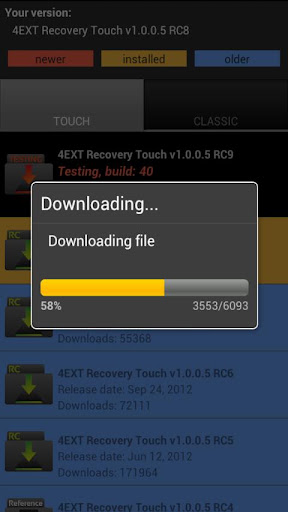
*) Safely online install or upgrade 4EXT Recovery (md5sums are automatically verified)

*) View all changelogs or known issues of any version available to your device.

*) Stay informed about any newly discovered bugs


*) The following example would be possible to do in just one session (one reboot in to recovery):
-> Restore a backup
-> Create a backup or advanced backup before the restore process starts
-> Format all you partitions in a file system of your choice before the restore process starts
-> Flash as many zip files you want after the restore is complete
-> Fix permissions afterwards if you like
-> Select to stay inside recovery or reboot automatically once all actions are complete

*) .. and much more! Please see www.4ext.net


4EXT Recovery Control apk Videos and Images


Visit us on http://apkandroiddownloads.blogspot.com

download


Android Apk
Read More..

GSM REMOTE CONTROL SWITCH

| 0 comments |


GSM REMOTE CONTROL SWITCH
Remote control using a cell phone from anywhere in the world!

(GSM Version and CDMA Version)


The GSM-AUTO is a GSM remote control switch, it connects to the cell phone network and like a cell phone has its own cell phone number. The GSM-AUTO is activated by calling its cell phone number, it will recognise an authorised telephone number calling it, reject the call without answering and switch on or off the device connected to it, because it rejects the call without answering there are no call costs incurred.
It has 2 independent relay switches with normally open and normally closed switch contacts, these can be programmed to switch on for a pre-determined length of time whenever the GSM-AUTO is called.
The relay switches can also be temporarily or permanently switched on or off by sending the GSM-AUTO a sms text message command. It can report the relay status by sending back a text message.
 
Applications
Applications are endless and include the remote control of heating and air conditioning in holiday homes, lighting, engine pre-heaters, aviation engine heaters, irrigation systems, water well pumps, pumping stations, cabin heaters, power cycle and reboot of remote servers, routers and computers.
New functions on our new GSM-AUTO box
  • Additional MODE command,then you can use the dial to switch the relay output, not only toggle the relay to work a GOT timer delay.
  • Additional on board battery to remain the inside clock when power off.
  • More freely when select to work at Open access mode ( ACM=OFF). any number can dial to control the device,any phone number can send the SMS to control the device. then our device would be very easy for customer to use on the side. not complicated programming.
  • Additional fast teach button, would save a lot time to read the manual command carefully. easy to press the button to teach the deive and then can control the device very easily.
GSM-AUTO android and Iphone mobile phone software:
GSM-AUTO (GSM-AUTO-AC) Software for Android system mobile phone
GSM-AUTO (GSM-AUTO-AC) Software for iphone system mobile phone


  • Quad band GSM-850, GSM-900, GSM-1800, GSM-1900 MHz so will work anywhere in the world where there is a GSM cell phone network
  • Two independent relays that can be programmed to switch on for a period of time between 1 second and 18 hours when the unit is called. Two access modes are available, open access where the GSM-AUTO will respond to any incoming call, and secure access where it will only respond to programmed authorized telephone numbers.
  • Up to 500 authorized user telephone numbers can be added to the white list, when the secure access mode is activated only the numbers in the white list are able to activate the GSM-AUTO. Authorized numbers can be added and deleted as required by sending the unit sms text commands.
  • The relays can be permanently switched on or off by sending the GSM-AUTO a text message command, a confirmation text can be returned if required.
  • The relays can be temporarily switched on for a period of time between 1 second and 18 hours by sending the GSM-AUTO a text message command, a confirmation text can be returned when the relays turn on and off if required.
  • Two relays with normally open (N.O) and normally closed (N.C) contacts, maximum switching capacity is 10 amps @ 230V ac per relay.
NOTE: You will need a SIM card, the GSM-AUTO is not locked to any cell phone network so it can be used with any GSM network provider. You can purchase SIM cards here SIM cardsSome US network providers are now locking sim cards to the phone they were purchased with, this means the sim card will not work with any other device. Call your network provider and ask them to unlock the sim card, they will ask for the IMEI number of the device you wish to use the sim card with, this can be found on a white label just above the antenna connection. From the feedback we have received it seems that AT&T are helpful whereas simple mobile, trak-phone and Verizon are not. 
You will also need a 12 volt DC power supply with a current rating of 500mA (0.5 Amp), a suitable US power supply can be found above.


GSM REMOTE CONTROL SWITCH SPECIFICATIONS
Power supply12V-24 AC/DC or AC100V-240V
Power consumption
Maximum during communication 600mA, typically 60mA
Relay contacts
2 x Normally Open and Normally Closed contacts maximum switching capacity 10 amps @ 230V ac per relay
GSM BandsGSM 850 / 900 / 1800 / 1900 MHz
Operating temperature-10°C to 60 °C
Physical size130 x 100 x 50 mm
ProtectionIP 65
ApprovalsCE
Read More..