Showing posts with label 8. Show all posts

WordPress Essentials The Definitive Guide To WordPress Hooks

| 0 comments |
If you’re into WordPress development, you can’t ignore hooks for long before you have to delve into them head on. Modifying WordPress core files is a big no-no, so whenever you want to change existing functionality or create new functionality, you will have to turn to hooks.
wp-hooks-guide
In this article, I would like to dispel some of the confusion around hooks, because not only are they the way to code in WordPress, but they also teach us a great design pattern for development in general. Explaining this in depth will take a bit of time, but bear with me: by the end, you’ll be able to jumble hooks around like a pro.

Why Hooks Exist

I think the most important step in grasping hooks is to understand the need for them. Let’s create a version of a WordPress function that already exists, and then evolve it a bit using the “hooks mindset.”
function get_excerpt($text, $length = 150) {
$excerpt = substr($text,$length)
return $excerpt;
}
This function takes two parameters: a string and the length at which we want to cut it. What happens if the user wants a 200-character excerpt instead of a 150-character one? They just modify the parameter when they use the function. No problem there.
If you use this function a lot, you will notice that the parameter for the text is usually the post’s content, and that you usually use 200 characters instead of the default 150. Wouldn’t it be nice if you could set up new defaults, so that you didn’t have to add the same parameters over and over again? Also, what happens if you want to add some more custom text to the end of the excerpt?
These are the kinds of problems that hooks solve. Let’s take a quick look at how.
function get_excerpt($text, $length = 150) {

$length = apply_filters("excerpt_length", $length);

$excerpt = substr($text,$length)
return $excerpt;
}
As you can see, the default excerpt length is still 150, but we’ve also applied some filters to it. A filter allows you to write a function that modifies the value of something — in this case, the excerpt’s length. The name (or tag) of this filter is excerpt_length, and if no functions are attached to it, then its value will remain 150. Let’s see how we can now use this to modify the default value.
function get_excerpt($text, $length = 150) {

$length = apply_filters("excerpt_length");

$excerpt = substr($text,$length)
return $excerpt;
}

function modify_excerpt_length() {
return 200;
}

add_filter("excerpt_length", "modify_excerpt_length");
First, we have defined a function that does nothing but return a number. At this point, nothing is using the function, so let’s tell WordPress that we want to hook this into theexcerpt_length filter.
We’ve successfully changed the default excerpt length in WordPress, without touching the original function and without even having to write a custom excerpt function. This will be extremely useful, because if you always want excerpts that are 200 characters long, just add this as a filter and then you won’t have to specify it every time.
Suppose you want to tack on some more text, like “Read on,” to the end of the excerpt. We could modify our original function to work with a hook and then tie a function to that hook, like so:
function get_excerpt($text, $length = 150) {

$length = apply_filters("excerpt_length");

$excerpt = substr($text,$length)
return apply_filters("excerpt_content", $excerpt);
}

function modify_excerpt_content($excerptAndroid Apk
Read More..

Windows 8 Launcher apk New Version

| 0 comments |
Windows 8 Launcher apk

Current Version : V40
Requires Android : 1.5 and up
Category : Tools
Size : 1.1M

Original Post From http://apktoolsdownload.blogspot.com


Windows 8 Launcher apk Description

* No restriction on android version, support all android phones

* Mainly it's free, Lightweight version.

* Get ready for an entirely new look on your Device!

* This application still under development need your support and reviews.


* This launcher allows you to feel windows 8 look on your Device.

* You can replace this home application with the default one and access everything on your phone through Windows 8 for Android

* Enjoy Windows 8 for Android and for suggestions or questions please mail me at amitmodak89@gmail.com
* Support for android 2.1 Eclair.

* Fixed some small bugs.

* Removal of Samsung music player Issue.

* Removed root Message problem.

* Added Calculator and Calendar to home screen

* Unexpected Crash issue solved.

* Reduced size bit and performance increased bit. :-)

* Removed root Message problem.

Note : This launcher is under testing phase and will not run on tablate.

NOTE: GOING TO LAUNCH 1st FULL V40ON RELEASE IN JUST FEW DAYS

This app will add a few search access points on your device. If you do not want to use this new search page, you can either ignore it or delete it. If you do use it, we get a few cents and it will help us a lot to keep developing more apps. If you don’t, you can delete it and no harm is done (our app remains the same, no need to uninstall it!). Thank you.


Windows 8 Launcher apk Videos and Images


Visit us on http://apktoolsdownload.blogspot.com

download


Android Apk
Read More..

eWeather HD Radar HD Alerts v4 8 2 APK download

| 0 comments |

dXGMX
Download this featured app. premium app free download.
features :
  • HD radar
  • 10 days forecast
  • black ice
  • cloudy
  • 100 latest earth quake
  • current weather condition
  • 24 hour , hour by hours
  • full tab support
unnamed (1)unnamed (2)unnamed (3)unnamed (4)unnamed


Android Apk
Read More..

SuperPay Me Review Make money online The Most Trusted

| 0 comments |

Super Pay Me - Get Paid For Completing Offers


Super Pay Me is a company that has been operating since June 2012, where members can earn money by completing various simple tasks, viewing other sites, surveys and completing other offers. So far, the site has been paying without delays and you can find many payment proofs on the site and on the internet. Currently, they have more than 63,000 registered members.
 

How to Earn Money with Super Pay Me


Signing up with Super Pay Me is free and no pre-requirements or membership fee is required. Super Pay me is open to all, including international countries.

There are various ways that you can use to earn money, such as, viewing of paid to click websites, watching videos, participating in various contests, completing online surveys, participating in trials and completing of many other available offers.
How to Get Paid by Super Pay Me

You can request for payment anytime you have reached INR 62.33 ($1.00.). All payments are processed and made within 24 hours. You get paid through any of the following payment processors and e-currencies; Paypal, Payza, Liberty Reserve and Moneybookers. You also get a chance to select whether you want to be paid as an Amazon gift card instead of cash.
Super Pay Me Referral System


Super Pay Me offers a good referral system where you earn up to 25% of all your referral earnings, including paid to click.
Pros  
  • Open to all, including international countries and no pre-requirement is needed.
  • Very low payment threshold of INR 62.33 ($1.00.).
  • Good referral system where you earn up to 25% of your referral earnings.
Cons
  • Most offers are for residents of USA, Canada, Australia, Spain and Italy. If you are from other countries, you may only get few offers.
  • Strict terms of use - your account may get banned for simple things like, using a different IP. Make sure you read their terms of use before you can start completing offers.
  • No forum where members can air their concerns.
  • You may be required to provide your personal identification documents for further verification before getting paid. 
Lastly, Super Pay Me offers a good opportunity for you to earn money by completing different small offers. However, some people have complained of their account getting marked as cheater" when they requested for payment or been asked to provide personal documents for identification purposes before getting paid. If you are thinking of joining Super Pay Me, make sure you read their terms of use to avoid getting yourself into problems or getting your account banned. 


Android Apk
Read More..

Download K Lite Codec Pack 10 0 8 Update Free PcSoftGuru

| 0 comments |
9 Oct 2013 - K-Lite Codec Pack 10..8 Update Download : To stay away from conflict when you have to reproduce sound and audio files, there we have video codec software program that allow you to even get rid of problems when you have to execute DVDs. K-Lite Codec Pack v10..eight is all you need. The codec will be integrated to any media players for windows.
Download K-Lite Codec Pack 10.0.8

This is the cumulative update for K-Lite Codec Pack ten, which counts with all the prior updates so as not to deal with bothering uninstallations, in this way you will only contain modifications and recent adjustments.

K-Lite Codec Pack 1008 Update present compatibility with K-Lite and K-Lite Mega Codec packs and it updates Media Player Classic, ffdshow, DivX, XviD, X264, Haali Media Splitter, FLV splitter, AC3ACM, InterVideo DVD decoder and InterVideo audio decoder.

K-Lite Codec Pack Update 10..eight Download

K-Lite Codec Pack Update includes almost everything you want to play all common audio and video file formats. It also offers additional functionality such a thumbnail generation in Explorer.

Software Informations:

Developer: Codec Guide
License: Freeware / Cost: $

Size: 13.1MB
OS: Windows 8 Windows 7 Vista 03 XP
Date Published: October 08, 2013
Report Broken Link or Copyright Problem
Direct Download K-Lite Codec Pack 10..eight Offline Installer


Android Apk
Read More..

AppMgr Pro III App 2 SD apk Latest Version

| 0 comments |
AppMgr Pro III (App 2 SD) apk

Current Version : 3.10
Requires Android : 2.2 and up
Category : Tools
Size : 1.9M

Original Post From http://apkandroiddownloads.blogspot.com


AppMgr Pro III (App 2 SD) apk Description

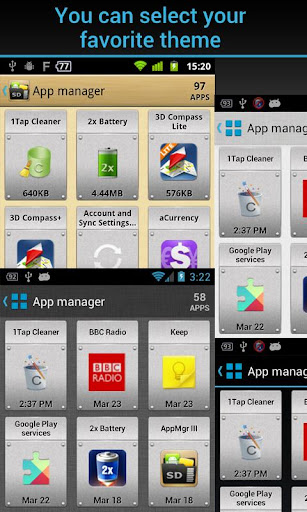
AppMgr (also known as App 2 SD) is a totally new design app that provides the following components:
Move apps: moves apps to either internal or external storage for getting more available app storage
Hide apps: hides system (built-in) apps from the app drawer
App manager: manages apps for batch uninstalling, moving apps or sharing apps with friends

* Over 18,000,000 Downloads! *

★ new ICS style UI, themes
★ batch uninstall apps
★ batch move apps to external storage
★ notify when movable apps installed
★ hide apps from app drawer
★ 1-tap to clear all cache
★ batch clear apps cache or data
★ batch view apps on Google Play
★ export the app list
★ install apps from the exported app list
★ quick uninstall or move an app by drag-n-drop
★ sort apps by name, size or installation time
★ share customized app list with friends
★ support home screen widgets
★ support Android 2/3/4
★ support "Move2SD Enabler"
★ customizable notification sound, vibrate and light

Move apps:
Are you running out of application storage? Do you hate having to check each and every app if it supports moving to the SD card? Do you want an app that automatically does this for you and can notify you when an app can be moved? This component streamlines the movement of apps to on your device's external or internal storage through your device's Settings. With this, you'll have more control over your ever expanding collection of apps. This is crucial to anyone who has memory management issues.

Hide apps:
You don't care for all the apps your carrier adds to Android? Well, now you can get rid of them!This component enables you to hide system (built-in) apps from the app drawer.

We have been selected as a Google I/O 2011 Developer Sandbox partner, for its innovative design and advanced technology.

Note:
* Move apps function may not work on your device as manufacture removes the function of moving apps to SD from Android system (not support: S3-S4, S DUOS, Note2, Tab 2, L5-L9, OneX, 7-10" tablet)
* Due to the limitation of Android, the hide apps function can only be supported by Android 4+
* Read user's manual or FAQ by going to: AppMgr > Settings > About

KW: app 2 sd, move app to sd, app2sd, a2sd, cache cleaner, cache eraser, hide app

Credits:
Arabic-Mohamed Hany
Bulgarian-Димитър Димитров
Croatian-Bruno Švorinić
Czech-Michal Fiurášek
Danish-Christian Stangegaard Kappelgaard
Dutch-Niko Strijbol
French-Jérémy Roth (JeremX)
Filipino - Vincent C. V. Estrellado
Finnish-Teemu Paavola
Galician-Xesús M. Mosquera Carregal
German-Wolfgang Dinter
Greek-George Georgiadis
Hebrow-Benjo26
Hindi-AzamAli
Hungarian-RootRulez
Italian-Luca Trevisan
Lithuanian - bronxitas
Japanese-nnnnn
Macedonian-Петар Пехчевски
Polish-Kamil Szymański
Portuguese-Altieres Lima da Silva, , Luis Barbosa de Assis Junior
Romanian-Stelian Balinca
Russian-Павел Алексеев
Serbian-Branko Radičević
Slovak-Patrik Žec
Spanish-Lahiri López
Swedish-Henrik Andersson
Tamil - KUMAR D
Turkish-Kutay KuFTi
Ukrainian - Михайло Грицина
Vietnamese-Phong Quang PdaViet

If you are interested in helping us to translate this app to your native language, please let me know. Thanks.


AppMgr Pro III (App 2 SD) apk Videos and Images


Visit us on http://apkandroiddownloads.blogspot.com

download


Android Apk
Read More..

Game Asphalt 8 Airbone HD Full Apk Data Free Android

| 0 comments |
Asphalt 8 Airbone HD Full Apk + Data

Game Asphalt 8 Airbone HD Full Apk + Data Free Android - Untuk para pecinta gamers mobile terutama android jangan lewatkan game yang satu ini, Pengembang dari game ini yaitu gameloft, merilis versi terbaru dari game sebelumnya, game terbaik for android ini merupakan game racing yang mungkin sudah pernah anda coba mainkan entah itu di perangkat symbian ataupun iphone, serta game ini tidak kalah bagus nya dengan game racing yang sebelumnya sudah saya berikan yaitu game Ridge Ricer Slipstream.

Game mobil racing ini sangat banyak yang memainkan karena kualitas grafis 3D HD serta sound efek nya serta mobil nya yang sangat keren yang pasti nya sangat memukau untuk di mainkan, game yang yang harus di mainkan dengan penuh konsentrasi dan memacu adrenalin. Jadi anda jangan lewatkan game terbaik ini dan pasti nya untuk anda coba.

Asphalt 8 Airbone HD Full Apk + Data Free Android

Asphalt 8 Airbone HD Full Apk + Data Free Android

Asphalt 8 Airbone HD Full Apk + Data Free Android

Download APK Asphalt 8 Airbone HD Full
-[CLICK HERE]-

  Download SD Data Asphalt 8 Airbone HD Full | 2 part
-[Part 1]- | -[Part 2]- 

 Cara Instal Game Asphalt 8 Airbone HD Full

1. Instal Game Asphalt 8 Airbone.apk
2. Copy Folder "
com.gameloft.android.ANMP.GloftA8HM " ke folder sdcard/Android/obb
3. Koneksikan jaringan internet untuk pertama kali main game 

Sekian posting Game Asphalt 8 Airbone HD Full Apk + Data Free Android kali ini yang  saya berikan  semoga bermanfaat dan selamat memacu adrenalin dalam bermain game ini.
Read More..

Navitel Android 8 5 full map

| 0 comments |
Bahan :
  1. Navitel 8.5 ->download via XC
  2. Maps ->download via PC

Cara Install :
  1. Download bahan
  2. Install navitel 8.5 seperti menginstall aplikasi android biasanya atau klik pada navitel_8.5.apk
  3. Setelah selesai, install maps di komputer jangan di HH karena formatnya adalah .exe
  4. Jika sudah selesai menginstall maps di komputer, masuk ke C:myMaps
    avigasiNavitel 
  5. copy file dengan format ".nm2" ke sdcard/NavitelContent/Maps. boleh via flashdisk (karena XC support OTG) atau langsung sambungkan XC agan langsung ke komputer via USB.
  6. Jika langkah - langkah diatas telah selesai, buka aplikasi navitel.
  7. Pilih bahasa sesuai selera
  8. Pilih Accept
  9. Jika muncul pesan warning pilih OK
  10. Akan muncul pop up navitel navigator, pilih NO
  11. Jika muncul popup lagi, pilih open excisting Maps
  12. maka akan muncul loading maps, tunggu hingga loading mencapai  100%
  13. akan muncul beberapa pesan/pop up, abaikan semua dengan memilih NO atau yang bertanda silang merah.
  14. jika sudah selesai silahkan mnikmati aplikasi navitel anda.
NB : 
setiap orang bisa menggunakan langkah yang berbeda - beda, itu semua tergantung pengguna. karena anda menggunakan smartphone maka anda juga harus lebih smart dari smartphone anda.

SS Navitel ane 
peta
menu setting
menu setting
main menu


Read More..

Photo Studio PRO 0 9 8

| 0 comments |
Amazing Photo Studio for Android!

Photo Studio for Android� is utilized by both amateur and professional photographers who seek simple, but powerful image processing on-the-go. Users can turn their devices into a fantastic photo editing studio.

Main features:

- Base photo operations: brightness, contrast, RGB color adjustment, hue, saturation;
- 115+ unique filters in categories: Lomo, Vintage, Simple tone, Old Style, Summer mood and Art.
- 12 amazing effects: shadow, fabric, akvarel, rust, frame, scratch, light, fire, water, heart, brush and noise.
- Magic Tools for photo correction: Auto-Levels, Sharpening and Red-Eyes correction.
- PicFrames helps you combine multiple photos into amazing looking frames with 60+ templates.
- Color Splash editor: create stunning artwork with your photos by removing or changing colors.
- Apply set of beautiful digital frames to your photos.
- Base transform operations: resize, rotate and crop.
- Apply several operations to one photo: you can edit a photo and apply all features and effects to one photo at the same time.
- Save the result in two formats: Small and Normal.

$2.99

---------------------------------------------------------------------


REQUIRES ANDROID:2.2 and up

Download Apk :
Photo Studio PRO 0.9.8 - Zippyshare

Market :
https://play.google.com/store/apps/details?id=com.kvadgroup.photostudio_pro
Read More..

iPhone iOS 8 Family Sharing iPhone 6 and iPhone 6 Plus Tips

| 0 comments |
With Family Sharing, up to six family members can share their iTunes Store, iBooks Store, and App Store purchases, a family calendar, and family photos, all without sharing accounts.

One adult in your household—the family organizer—invites family members to join the family group and agrees to pay for any iTunes Store, iBooks Store, and App Store purchases those family members initiate while part of the family group. Once set up, family members get immediate access to each other’s music, movies, TV shows, books, and eligible apps. In addition, family members can easily share photos in a shared family album, add events to a family calendar, share their location with other family members, and even help locate another family member’s missing device.

Children under 13 can participate in Family Sharing, too. As a parent or legal guardian, the family organizer can provide parental consent for a child to have his or her own Apple ID, and create it on the child’s behalf. Once the account is created, it’s added to the family group automatically.

Family Sharing requires you to sign in to iCloud with your Apple ID. You will also be asked to confirm the Apple ID you use for the iTunes Store, iBooks Store, and App Store. It is available on devices with iOS 8, Mac computers with OS X Yosemite, and PCs with iCloud for Windows 4.0. You can be part of only one family group at a time.

Set up Family Sharing.

Go to Settings > iCloud > Set Up Family Sharing. Follow the onscreen instructions to set up Family Sharing as the family organizer, then invite family members to join.

Create an Apple ID for a child.

Tap Settings > iCloud > Family, scroll to the bottom of the screen, then tap Create an Apple ID for a child.

Accept an invitation to Family Sharing.

Make sure you are signed into iCloud, and that you can accept a Family Sharing invitation from your iOS device (iOS 8 required), Mac (OS X Yosemite required), or PC (iCloud for Windows 4.0 required). Or, if the organizer is nearby during the setup process, he or she can simply ask you to enter the Apple ID and password you use for iCloud.

Access shared iTunes Store, iBooks Store, and App Store purchases.

Open iTunes Store, iBooks Store, or App Store, tap Purchased, then choose a family member from the menu that appears.

When a family member makes a purchase, it is billed directly to the family organizer’s account. Once purchased, the item is added to the initiating family member’s account and is shared with the rest of the family. If Family Sharing is ever disabled, each person keeps the items they chose to purchase—even if they were paid for by the family organizer.

Turn on Ask to Buy.

The family organizer can require young family members to request approval for purchases or free downloads. Go to Settings > iCloud > Family, then tap the person’s name.

Note:

Age restrictions for Ask to Buy vary by area. In the United States, the family organizer can enable Ask to Buy for any family member under age 18; for children under age 13, it’s enabled by default.

Hide your iTunes Store, iBooks Store, and App Store purchases.

Open iTunes on your computer, then click iTunes Store. Under Quick Links, click Purchased, then choose the content type (for example, Music or Movies). Hover over the item you want to hide, then click . To make purchases visible again, return to Quick Links, then click Account. Scroll down to iTunes in the Cloud, then click Manage (to the right of Hidden Purchases).

Share photos or videos with family members.

When you set up Family Sharing, a shared album called "Family" is automatically created in the Photos app on all family members’ devices. To share a photo or video with family members, open the Photos app, then view a photo or video or select multiple photos or videos. Tap , tap iCloud Photo Sharing, add comments, then share to your shared family album. See iCloud Photo Sharing.

Add an event to the family calendar.

When you set up Family Sharing, a shared calendar called "Family" is automatically created in the Calendar app on all family members’ devices. To add a family event, open the Calendar app, create an event, then choose to add the event to the family calendar. See Share iCloud calendars.
Set up a family reminder.

When you set up Family Sharing, a shared list is automatically created in the Reminders app on all family members’ devices. To add a reminder to the family list, open the Reminders app, tap the family list, then add a reminder to the list. See Reminders at a glance.

Share your location with family members.

Family members can share their location by tapping Settings > iCloud > Share My Location. To find a family member’s location, use the Find My Friends app (download it for free from the App Store). Or, use the Messages app (iOS 8 required).

Keep track of your family’s devices.

Go to Settings > iCloud > Family, tap your name, then choose to let family members track your devices. To help a family member find his or her device, open the Find My iPhone app. For more information about keeping track of devices, see Find My iPhone.

Leave Family Sharing.

Go to Settings > iCloud > Family, then tap Leave Family Sharing. If you are the organizer, go to Settings > iCloud > Family, tap your name, then tap Stop Family Sharing.

Read More..